
Most misunderstandings about VPNs arise from the idea of ‘protecting the connection’ being broadened to mean ‘protecting everything’. VPN (Virtual Private Network) is a technology that creates an encrypted passage between your device and the VPN server and sends Internet communications to the destination through that passage and the VPN server. There are two things to do. It encrypts communication from the device to the VPN server, and shows the VPN server's IP instead of your IP on the destination site. This article corrects eight common myths one by one with facts and evidence, and tabulates the effectiveness of VPNs against 11 threats.
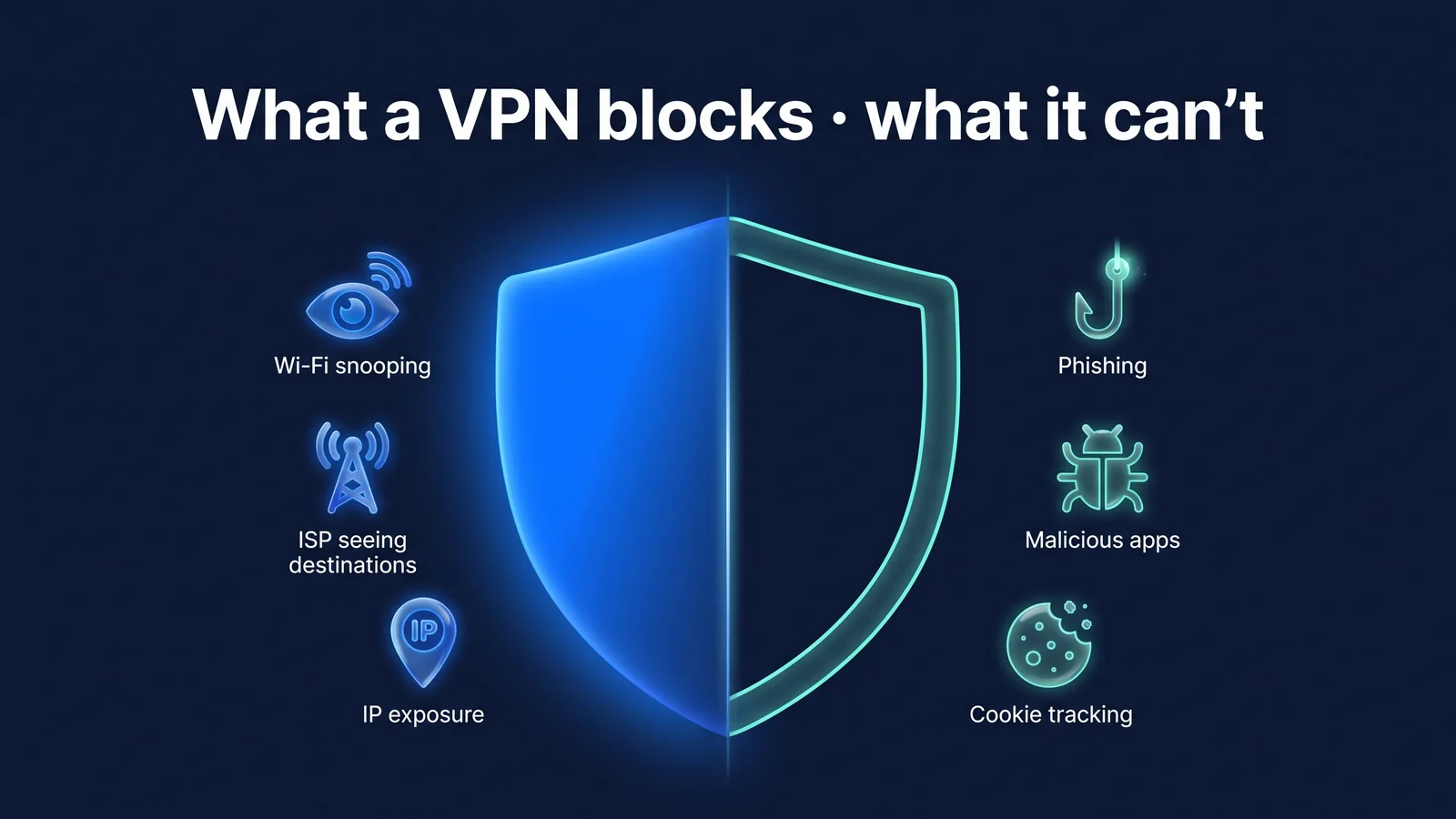
Who won't be able to see what if you turn on a VPN?
Turning on a VPN will most significantly reduce the line of sight for observers between your device and the VPN server. This includes users of the same Wi-Fi, Wi-Fi operators, and carriers. Conversely, the view of the sites you visit and the services you log into rarely changes other than your IP. The destination information is moved to a location visible to the VPN operator.
- my devicesmartphone
- Destination/DNS shown
- Public Wi-Ficafe router
- Destination/DNS shown
- communications networkinternet service provider
- HTTPS (if supported)
- websiteI see my IP
- Site HTTPS
- Areas that may be exposed
- my devicesmartphone
- VPN encryption
- Public Wi-Ficafe router
- VPN encryption
- VPN serverStageVPN
- HTTPS
- websiteServer IP is visible
- VPN encryption
- Site HTTPS
| observer | Without VPN | Use a VPN |
|---|---|---|
| Other users/fake access points on the same Wi-Fi | Name of the site you are accessing, content of communication other than HTTPS | The fact that there is encrypted communication with the VPN server and the amount of data |
| Wi-Fi operator/communication company | Visited domain, access time, data volume | VPN server address, connection time, data amount |
| VPN operator | Not applicable | Connection IP and destination information (HTTPS content cannot be viewed) |
| Sites visited | My public IP, approximate location, login/cookie information | VPN server IP, login/cookie information remains the same |
| Track logged in services and ads | Link your activity to account, cookie and device information | Connect as is (only IP changes) |
The StageVPN app (iPhone·iPad·Android) sends communication from the entire device through this route, while StageVPN for Chrome only sends communication from the Chrome browser through this route. The difference between the two methods is Browser VPN vs App VPNWell, the encryption method used by the app is Explaining WireGuard PrinciplesI organized it in .
The row of note in the table is 'VPN Operator'. Destination information that was visible to the carrier before turning on the VPN can be seen by the operator after turning on the VPN. In other words, a VPN doesn't destroy your information; it changes where you see it. That's why it's important what operators record and when they erase it. What StageVPN keeps: Access record storage noticeIt is fully disclosed and is covered in detail in Myth 8. Let’s look at the myths one by one based on this table.
Myths 1-4: Misconceptions about the scope of connectivity and protection
The first four myths stem from a broader view of what VPNs cover than they actually are. The section that a VPN encrypts is from your device to the VPN server. The section after that is protected by the site's own HTTPS.
“If you turn on VPN, you won’t be hacked.”
actually VPN only reduces spying and interception of network sections, but damages from phishing, malicious apps, and password leaks remain the same.
reason Much of the damage we call hacking begins with user input and devices, not the network. If you enter your password on a fake login page, your information will be handed over to the attackers, whether encrypted or not. An attack in which a password leaked from one service is used to log in to another service is also unrelated to the network section. This attack occurs when passwords are shared in multiple places. NIST's Remote Access Security Guide (SP 800-46) also describes VPN as a means of protecting communication paths, leaving device and account protection under separate control.
What to do instead Turn on two-step verification for important accounts and use different passwords for each service. Instead of using links sent by text or email, access the official app or an address you know.
“If you only use HTTPS sites, you don’t need a VPN.”
actually HTTPS protects the page content, but the domain you are accessing, DNS queries, and your IP are visible to networks and sites.
reason HTTPS (TLS) encrypts content between your browser and the site. However, which server you are connecting to is revealed to the network by its IP address and TLS server name (SNI). DNS queries usually come out in clear text. This information may be used by public Wi-Fi operators or mobile carriers to tell which services you visit. Some app communications do not use HTTPS.
Use HTTPS only
- Page content is encrypted
- The connected domain and IP are visible on the network.
- DNS queries are usually plain text
Use VPN only
- Encryption from device to VPN server
- The section after the VPN server varies depending on the site.
- The VPN server IP is visible on the site.
use both
- Only communication with the VPN server is visible to the network
- The section after the VPN server is also protected with HTTPS
- Both content and destination are obscured
What to do instead When using public Wi-Fi or unfamiliar networks, use both VPN and HTTPS. The two protect different sections. Rules for public Wi-Fi Public Wi-Fi Safety RulesI organized it in .
“Incognito mode and VPN are the same thing”
actually Incognito mode is a browser function that does not leave visit history, cookies, or input records on your device, and does not change the network path or IP.
reason Chrome Help Center's incognito mode instructions explain that even in an incognito window, your activity may be visible to the sites you visit, your network operator, and your Internet service provider. What Incognito mode deals with is the records inside your device. What a VPN covers is the path outside your device.
What to do instead Use both together as needed. Incognito mode if you want to leave no records on a public PC, or VPN if you want to protect your route on public networks. To use StageVPN for Chrome in an incognito window, you must turn on 'Allow in incognito mode' in the extension management screen.
“Turn on VPN to make your internet faster”
actually Since one route is added, the speed is usually similar or slightly slower, and the perceived speed depends on the server distance and line conditions.
reason When you turn on a VPN, all communication goes through the VPN server to its destination. The further away the server is, the longer the round trip time will be. Encryption and decryption also require computation. WireGuard, which the StageVPN app uses, is designed to reduce this burden, but it cannot eliminate it. The delay will be greater if the country where the VPN server is located is far from the country where the destination server is located. There may be exceptions where a VPN can speed up around that limitation if your carrier slows down certain traffic, but this is not the typical result.
What to do instead If the perceived speed is low, switch to a nearby server and compare. StageVPN doesn't promise numerical speeds.
Top 11 Threats: What Does a VPN Work for?
VPNs are highly effective against threats in the network section, but have little effect on threats that occur within the device or on the account/service side. In the table below, 'reduced' means that the VPN directly reduces risk. ‘Partial’ means to reduce only a portion according to conditions. ‘Unreduced’ means independent of VPN.
| number | threat | VPN effect | reason | Additional Preparation Required |
|---|---|---|---|---|
| 1 | Eavesdropping on public Wi-Fi | decrease | Encryption from device to VPN server | Check your official Wi-Fi name |
| 2 | fake point of presence | portion | Communications are encrypted, but this does not protect information entered directly into the fake login screen. | Don't enter your account password on the Wi-Fi login screen |
| 3 | Identify the visited domains of telecommunication companies | decrease | DNS and destination go into tunnel | Check your VPN operator's logging policy |
| 4 | The IP the site sees and your approximate location | decrease | The VPN server IP is visible on the site. | Account country and location settings are managed separately |
| 5 | Phishing/Smishing | Does not decrease | User enters information directly | Access via official app/address instead of link, 2-step authentication |
| 6 | Malicious apps/malicious files | Does not decrease | Works on my device | Install official store, update operating system |
| 7 | Cookie/login-based tracking | Does not decrease | Identified by account and cookie | Cookie/tracking prevention settings, log out |
| 8 | Browser Fingerprinting | Does not decrease | Identified by a combination of device and browser characteristics | Your browser’s tracking prevention features |
| 9 | Service hacking and information leakage | Does not decrease | Happens on the service's servers | Different passwords for each service, changed immediately if leaked |
| 10 | Device loss/theft | Does not decrease | Problems with information stored on the device | Screen lock, remote lock/deletion settings |
| 11 | Communication while VPN is down | Does not decrease | Exit via normal route | Check connection status before sensitive operations |
There is a trick to reading tables. You can predict the effectiveness of a VPN by looking at ‘where’ the threat is coming from. It will decrease if it happens on the network between your device and the VPN server. It will not be reduced if it occurs within the device, on the service server, or at the discretion of the user. ‘Reduced’ here does not mean that it becomes impossible. Information such as connection time, data volume, and communication patterns can still be observed.
Let me give you two examples. If you use your banking app on cafe Wi-Fi, threats 1 and 3 are reduced by a VPN. However, if you click on the link in the 'Delivery Tracking' text message you received from the cafe and enter your password, Threat 5 will occur. If you lose your smartphone in a hotel abroad, even if you have a VPN turned on, Threat 10 depends on whether you have screen lock and remote wipe settings. In the same day, there are moments when a VPN helps and moments when it doesn't.
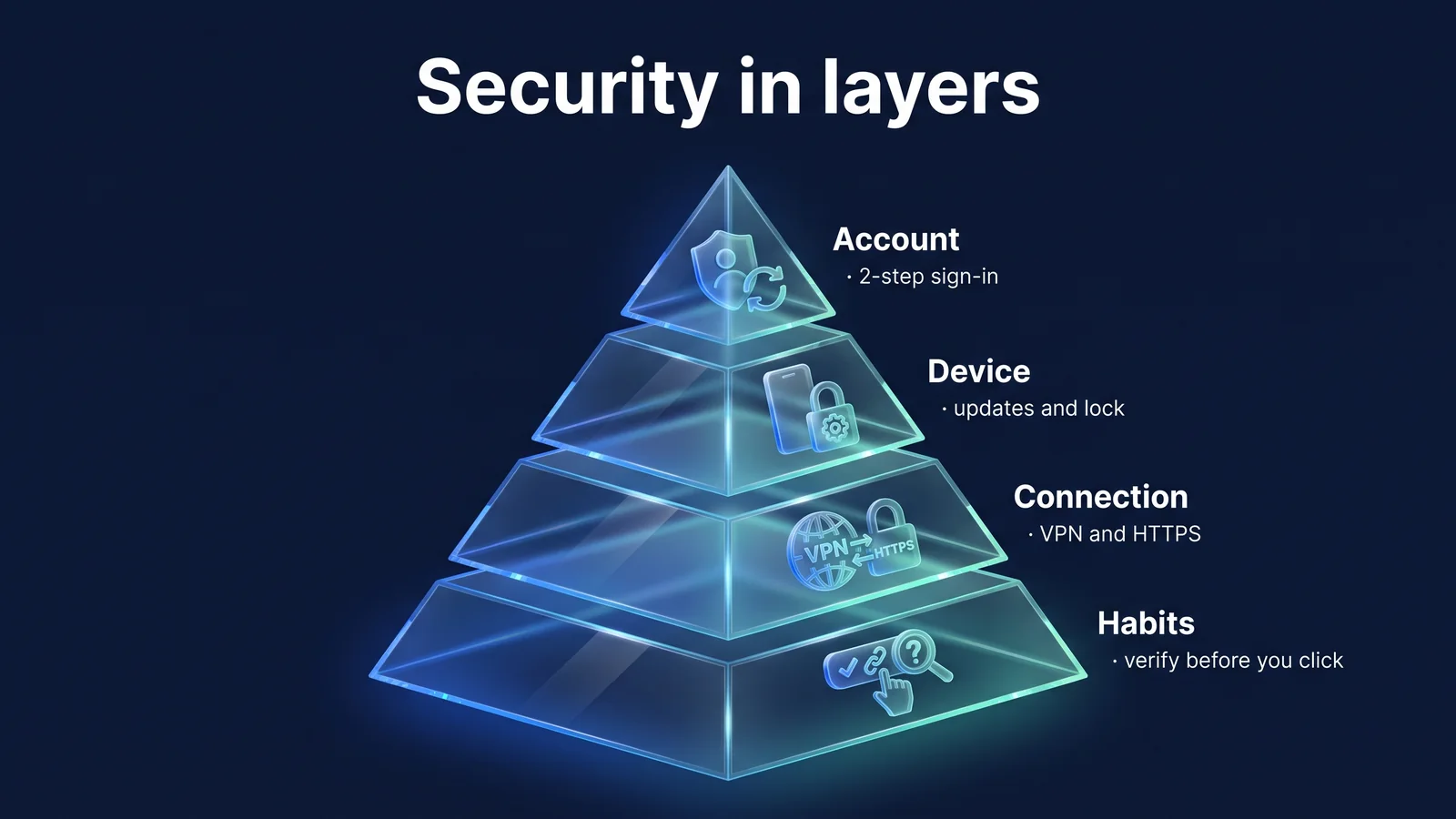
This distinction is like a way of dividing security into several layers. Each account, device, connection, and habit poses a different threat. A VPN takes on one of the connectivity layers. The picture below shows the relationship, and at the end of the article, the tasks for each layer are summarized.
Myths 5-8: Misconceptions about tracking, devices, the law, and anonymity
The following four myths arise from the broader understanding of the fact that a VPN changes your IP, meaning you become unrecognizable. IP is just one piece of information that identifies you. These four are also the most frequently seen expressions in VPN advertisements. The more familiar an expression is, the better it is to read it against the facts.
“When you turn on your VPN, personalized ads and tracking disappear.”
actually Advertising and tracking primarily relies on cookies, login accounts, and device identifiers, so it continues even when your IP changes.
reason Advertisers link your activity to cookies stored on your browser and your login account. Browser fingerprinting is a technique that identifies users using a combination of device characteristics such as screen size, font, and browser version. These methods do not use IP addresses. What changes with a VPN is the approximate location estimated by your IP. StageVPN does not offer any features to filter out ads or tracking scripts.
What to do instead Use your browser’s tracking prevention settings and cookie management functions. Log out of services you are not using. You can also reset your smartphone's advertising identifier or set tracking limits. Items that can be changed directly from your smartphone 10 smartphone privacy settingsI organized it in .
“VPN filters out malicious apps and phishing”
actually Malicious programs installed on your device operate inside the tunnel, that is, on your device, so the VPN does not filter them out.
reason A VPN encrypts communications leaving your device. Communications sent by malicious apps are also transmitted in the same way. The same goes for phishing pages. Since the attacker's site can also use HTTPS, you cannot judge it as secure just by displaying a lock in the address bar. The protection country of the Korea Internet & Security Agency (KISA) continues to report cases of smishing disguised as delivery, payment, or account verification. StageVPN does not offer file scanning or automatic blocking of dangerous sites as part of its offering.
- Text/email linkA message masquerading as a delivery, payment, or account confirmation message arrives.
- fake pageAttacker's site can also show HTTPS locks
- user inputEnter your ID, password, and authentication number directly.
- Forwarded to attacker serverThe VPN encrypts and transmits this communication just like any other communication.
What to do instead Install apps only from trusted paths, such as official stores. Keep your operating system and apps up to date. Do not click on links in texts or emails, but check directly using the official app or an address you know.
“With a VPN, you can use any overseas service and there is no legal liability.”
actually Each service has its own terms of use and local policies, and using a VPN does not relieve you of legal responsibility for your online behavior.
reason In addition to your IP, the site determines your region based on your payment method's country, account settings, and device information. If you connect to a domestic service that restricts foreign IPs through a Korean server, you can often use it as usual, but it depends on the service policy. StageVPN does not guarantee access to specific services or content. The laws and terms of service of the country you use apply as is. Some countries restrict the use of VPNs, so please check the Ministry of Foreign Affairs' overseas safe travel guidelines before leaving the country (as of September 2026).
What to do instead Before traveling, check the overseas connection settings for your bank and frequently used services. StageVPN’s prohibited activities are: Service Use PolicyWell, the travel preparations are Why you need a VPN abroadand Overseas travel VPN usage guideI organized it in .
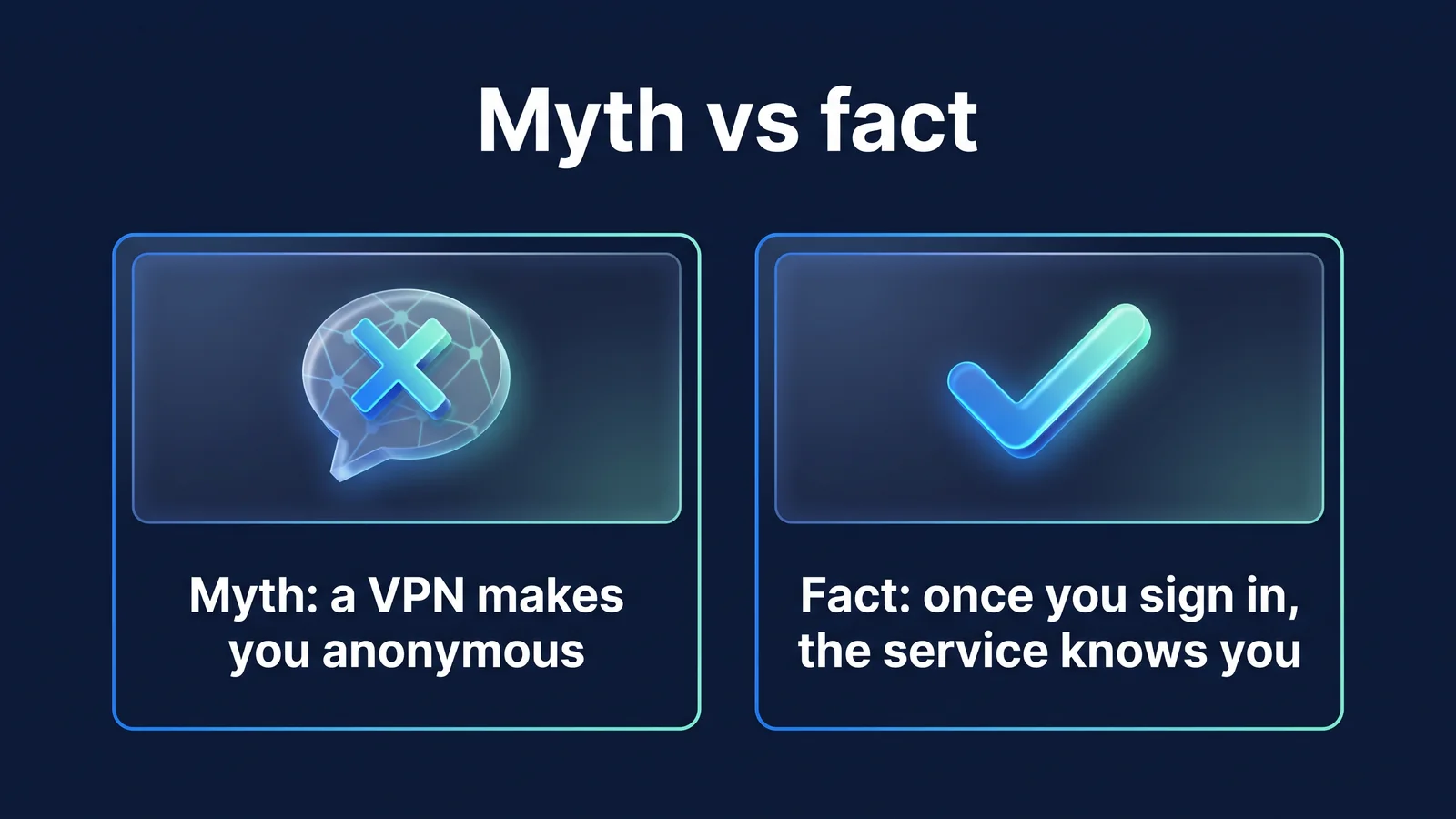
“When you turn on VPN, you become anonymous”
actually The IP shown on the site will only change, and when you log in, the service will recognize you by your account and the VPN operator will have access records in accordance with the law.
reason A VPN is a tool that makes it difficult to spy on communications in the middle of a network. It is not a tool to make users anonymous. The site recognizes you through your login account and cookies. The VPN operator is in a position to view connection IP and destination information. Korea's Enforcement Decree of the Communications Secrets Protection Act requires that Internet log records be kept for at least three months. StageVPN follows this standard by setting a retention period of 93 days and automatically deleting it after the period.
What to do instead Check what your VPN operator logs, know the terms, and write. Whichever VPN service you choose, make sure they have documented disclosures about what they keep, how long they keep it, and how they delete it, rather than advertising that they have 'no records'. The numbers below are StageVPN’s conditions.
- 3 months or more
- Internet log record retention period specified in Article 41 of the Enforcement Decree of the Communications Secrets Protection Act
- 93 days
- How long does StageVPN keep your connection records and then automatically delete them?
- 0 cases
- Communication recorded by StageVPN (page content, search terms, messages)
The StageVPN app records connection time, tunnel IP, destination IP and port, protocol, and user's connection IP. StageVPN for Chrome records connection time, account, user's connection IP, destination host name and port, destination IP, and amount of data transferred. Communication content such as page content, URL path and search terms, messages, and entered values are not recorded. Archived records will be provided to the extent necessary only upon request that meets the procedures prescribed by law, such as court permission (as of September 2026). Detailed standards are Access record storage noticeand privacy policyWell, the background is Why are we disclosing our access record retention policy?Check it out here.
What layer of security does a VPN assume?
VPNs occupy one of the five layers of connectivity. Online security is made up of multiple layers. The basic principle is to pack multiple layers together so that even if one layer breaks through, the other layers will block it. On each floor, I wrote down one thing I could do today.
- account securityService-specific password, two-step authentication, login device verification
- device securityUpdate operating system, lock screen, install only from official store
- Judgment and HabitCheck links and attached files, access directly to official address
- Browser/App SettingsPrevent tracking, manage app permissions, and clean up unnecessary logins
- connection securityVPN on unfamiliar networks, check HTTPS for sites
Account security and device security are layers that will have long-lasting effects once you set them up. Judgment and habit are needed every time. Connection security is turned on and off depending on the situation. StageVPN does not provide a feature that automatically blocks communication when the VPN is disconnected, so check the app's connection status before performing any sensitive operations. Common security habits Security habits beyond connectivityclass Privacy PolicyI organized it in .
- Today: Turn on two-step verification for your most important accounts (mail, banking, messenger).
- Today: Make sure your smartphone's screen lock and remote lock/wipe features are turned on.
- This week: Update your operating system and frequently used apps to the latest versions.
- This week: Check your browser's Do Not Track settings and log out of services you don't use.
- For each unfamiliar network: After getting past the Wi-Fi login screen, turn on the VPN, check the connection indicator, and get to work.
The conclusion of this article is one sentence. A VPN is a tool that protects your connection, and you need to take care of your accounts, devices, and habits separately. This principle is the same when turning on the StageVPN app and StageVPN for Chrome. Turn it on on an unfamiliar network, check the connection indicator, and prepare the remaining floors as usual. Then, the structure is completed where the VPN protects the floor covered by the VPN and the remaining floors are protected by the user.
| myth | actually | What to do instead |
|---|---|---|
| Turn on VPN to avoid being hacked | Reduces peeking only at network sections | Two-step authentication, service-specific passwords |
| If you have HTTPS, you don’t need a VPN | Domain/DNS/IP are still visible | Use both on a public network |
| Incognito mode and VPN are the same | Incognito mode only handles records on the device. | Used together for different purposes |
| Turn on VPN to make it faster | Usually similar or slightly slower | Compare with nearby servers |
| Ads and tracking disappear | Cookie/account-based tracking continues | Prevent browser tracking, log out |
| Filters out malicious apps and phishing | Threats inside the device are transmitted as is. | Check official store, updates, links |
| You can use any service and there is no liability. | Service policies and laws apply as is. | Check settings and local regulations before departure |
| Turn on a VPN to become anonymous | Identified as an account and a record of access remains | Know and use your operator’s logging policy |
| situation | Use a VPN | Take care together |
|---|---|---|
| Cafe/airport public Wi-Fi | Connect after passing the Wi-Fi login screen | Check your official Wi-Fi name, turn off file sharing |
| Overseas travel/business trip | Installation, login, test connection before departure | Check the Ministry of Foreign Affairs’ overseas safe travel and local embassy information. |
| Online shopping/finance | Turn on on public networks | Official app usage, payment notifications, 2-step verification |
| company work | Use in the manner determined by the company | Company security policy, if you need a static IP StageVPN Business |
| Smartphone used every day | Turn on from an unfamiliar network | Check app permissions, lock screen, update operating system |
The range of features offered by StageVPN is Features and Scope of OfferingHow to directly check for leaks Guide to DNS Leaks and WebRTC LeaksYou can see it here.
reference material
- NIST SP 800-46 Rev. 2: Guide to Enterprise Telework, Remote Access, and BYOD Security — Remote access, security role of VPN, separation of terminal and account control (US National Institute of Standards and Technology)
- NIST SP 800-77 Rev. 1: Guide to IPsec VPNs — VPN-protected sections and limitations (U.S. National Institute of Standards and Technology)
- Browse privately in incognito mode — What incognito mode hides and what it doesn’t (Chrome Help Center)
- RFC 8446: TLS 1.3 — Indicate scope and server name protected by HTTPS (IETF)
- KISA Protection Country&KrCERT/CC — Notice on smishing, phishing, and malicious apps (Korea Internet & Security Agency)
- Personal Information Protection Committee — Personal information protection rules and leak response information (Personal Information Protection Committee)
- Communications Secret Protection Act — Basis for storage and provision of communication confirmation data (National Legal Information Center)
- Ministry of Foreign Affairs Safe Travel Overseas — Travel safety information by country (Ministry of Foreign Affairs)