

6 AM · Incheon Airport Departure Hall
There are two hours left until boarding. Your smartphone automatically connects to the airport's free Wi-Fi. I see three networks with similar names, but I haven't confirmed which one is the airport's official network. In that state, open the banking app, check the exchange amount, and log in to your company email. The screen doesn't show that the laptop of the passenger sitting next to you is on the same network.
2pm · Local cafe
There was still time left until check-in at the hotel, so I stopped by a cafe. Connect to the cafe Wi-Fi using the password written on the receipt. The same password will be used by all guests who come to this cafe today. Upload your photos to the cloud and order items from a domestic shopping mall to receive after returning home. The order screen requires additional authentication because you are accessing from an overseas IP. A verification text message is sent to a domestic number, but smartphones with a local SIM card cannot receive the text message.
10pm · Hotel room
Enter your room number and last name to get past the hotel Wi-Fi login screen. Hundreds of guests use the same network. Login to the banking app is blocked due to the foreign IP blocking setting, and a notification pops up saying that this setting can be resolved by going to the branch. I connected to an unfamiliar network three times during the day and never once found out who was running it.
This one day shows why you need a VPN while abroad. In travel destinations, it is difficult for users to select or confirm the network to which they connect, and domestic services treat users who connect with foreign IPs differently. This article divides the problems that occurred in the above scenario into seven reasons. For each reason, I've written side by side what happens, what a VPN can do, and what a VPN can't do. At the end, we organized the pre-departure checklist into a table.
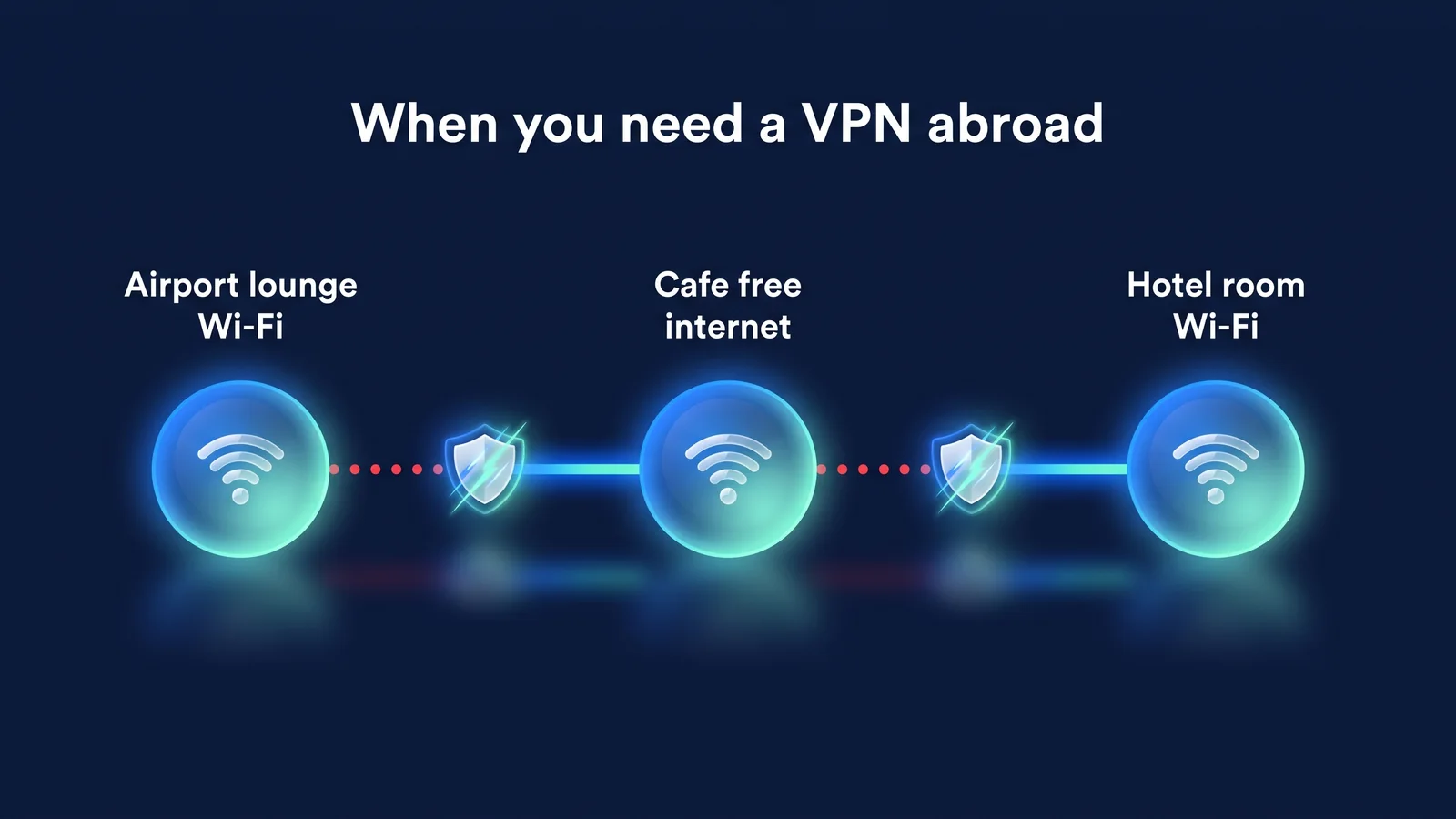
Reasons 1-2. Why is it hard to trust travel destination networks?
The reason it is difficult to trust the network at a travel destination is because the operator cannot be identified and users cannot choose the route through which communication takes place. In Korea, we use a network whose operator is known, such as our home Wi-Fi and the telecommunication company we subscribe to. Overseas, people switch between networks operated by airports, cafes, hotels, and local telecommunications companies several times a day.
I use airport, cafe, and hotel Wi-Fi with people I meet for the first time.
what happens
Strangers are connected together on the same router. If you don't have a password or all guests use the same password, unencrypted communications and DNS lookups (requests asking which site you're accessing) can be revealed within the same network. When connected to a fake access point (evil twin) created with the same name as the official Wi-Fi, communication passes through the attacker's device.
What a VPN does
The StageVPN app encrypts communications between your device and the VPN server with WireGuard. Other users of the same Wi-Fi and the network operator only see encrypted communications to the VPN server. All IPv4/IPv6 traffic and DNS lookups from across devices go into the tunnel.
What VPNs Can't Do
This does not protect card numbers or passwords you enter in the fake login screen before turning on the VPN. It's not the VPN's job to determine which network is real. Make it a habit to check the official network name with your staff first.
- my smartphoneStageVPN app on
- encryption tunnel
- Hotel/Airport Wi-FiContent and destination unconfirmed
- encryption tunnel
- VPN serverExample: South Korea
- HTTPS
- Website/App ServerConnect with VPN server IP
- VPN encryption
- Site HTTPS
- Areas that may be exposed
The U.S. Federal Trade Commission (FTC) explains that most websites today are encrypted with HTTPS, which reduces the chances of page content being exposed as is. Still, the risk of connection destinations, some app communications with weak encryption, and fake login screens remains. A VPN reduces the first two. Rules to follow when using public Wi-Fi 9 rules for public Wi-Ficlass Public Wi-Fi InformationI organized it in .
If you open an HTTPS site without a VPN, the page content will be encrypted, but the network will see which site you are accessing. This is because most DNS lookups that turn site names into addresses and server name representations in TLS connections pass unencrypted. When you turn on the VPN, this information also goes into the tunnel, and only the address of the VPN server is visible to the network. However, the site you access still knows your account and activities.
The user cannot choose the communication path for roaming, local SIM card, or eSIM.
what happens
For roaming, you borrow a base station from a local telecommunication company. For local SIM cards, the entire network is operated by local telecommunications companies. For travel eSIM, the seller and the actual network operator are often different, and some products have an Internet outlet located in a third country other than the travel destination. It is difficult to know which country and which operator my communications go through. Each business operates in accordance with the laws of its country.
What a VPN does
Only encrypted VPN communications are visible to operators in this section. Communication content and connection destination are hidden. When you connect to a Korean server, domestic services will see the Korean server's IP, not the eSIM's exit country.
What VPNs Can't Do
Data usage and connection times recorded by telecommunications companies for billing purposes remain regardless of the VPN. It is not possible to receive a verification text message from a domestic number on your behalf. How to receive text messages must be checked separately when choosing a communication method.
| means of communication | Where to run the route | Things to watch out for | VPN recommended |
|---|---|---|---|
| Domestic carrier roaming | Local carrier base station + domestic carrier | The fee is expensive and the route is different for each product. | recommended |
| local SIM card | local news agency | It may be difficult to receive a verification text message from a domestic number | recommended |
| Travel eSIM | Overseas network operator affiliated with seller | Internet exit country may be different from travel destination | recommended |
| Pocket WiFi (rental) | Rental device + local carrier | Everyone in your party shares the same network | recommended |
| Hotel/Airport/Cafe Wi-Fi | Facility or consignment company | Sharing with unfamiliar users, fake access point | Highly recommended |
'Highly recommended' in the table refers to using the same network as a stranger. ‘Recommended’ means going through a business operator whose route you do not know. If you have a dual SIM smartphone, before leaving the country, test whether you can receive texts from domestic numbers while using eSIM while using your domestic SIM card.
Reasons 3-4. Why do domestic services and company systems restrict overseas access?
The reason why domestic bank and company systems restrict overseas access is because they use the country of the access IP as a standard for security judgment. Connections from overseas IPs are difficult to distinguish from account theft attempts. So, some services block foreign IPs or require additional authentication, and companies only allow pre-registered IPs.
Domestic financial, public, and shopping services may restrict foreign IP access.
what happens
A representative example is the bank's overseas IP blocking service. KB Kookmin Bank informs you that this service restricts transfers, reporting, and certificate issuance unless the access IP is a domestic IP registered with the Korea Internet & Security Agency (KISA). Post Office Smart Banking also operates a service of the same name that blocks logins unless you have a domestic IP. This service is activated by the user directly, and cancellation is often possible only through the app or by visiting a branch (as of September 2026).
What a VPN does
StageVPN's default location is South Korea. When you connect to a Korean server, the service shows the IP of the Korean server. So, you may be able to use it as usual.
What VPNs Can't Do
Usage is not guaranteed. Services may separately restrict access via VPN or overseas servers, and each service makes the final decision. The post office also informs you that there may be restrictions in environments that use overseas servers. Mobile phone text authentication is required regardless of IP.
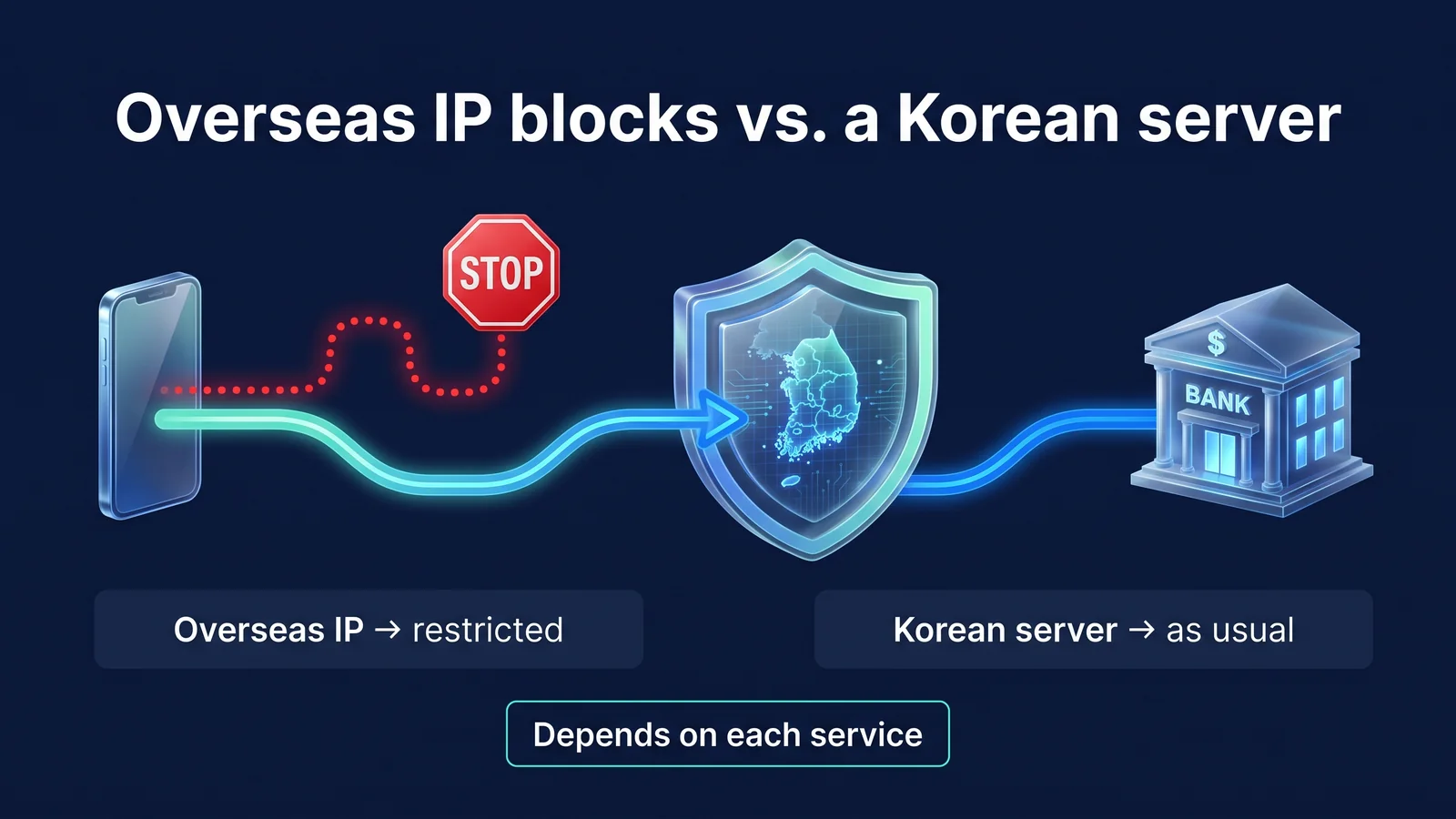
Which of the two paths in the picture will be different varies from service to service. The most reliable way is to check the overseas usage instructions for each service before leaving the country and handle any settings that need to be changed at a branch in advance. The table below summarizes things to check before leaving the country by service type.
| service | What can happen overseas | Check before departure |
|---|---|---|
| Banks/Securities | Login and transfer restrictions when setting up foreign IP blocking | Whether to set it up and how to cancel it (whether you need to visit a branch) |
| card | Overseas payments blocked, approval rejected due to abnormal transactions | Overseas payment acceptance settings, credit card company overseas contact information |
| Public/Government Services | Identity verification method does not work abroad | Install and test the certificate/authentication app in advance |
| Shopping/Delivery/Reservation | Mobile phone text verification not received | How to receive text messages from domestic numbers (roaming/dual SIM) |
| Mail/Messenger | Security notifications and locks with new location login | Have your 2-step verification method and recovery code ready. |
If you change server locations frequently, services such as email or SNS may determine that you are logging in from a new location and may send security notifications or require additional authentication. When traveling, it is better to stick to one location and receive fewer notifications. Since the card determines abnormal transactions based on the payment country and affiliated store regardless of IP, prepare the overseas payment permission settings and the card company's overseas contact information separately.
There are cases where your company's business system only allows company IP
what happens
IP whitelist refers to a security setting that only accepts connections from pre-registered IP addresses. If groupware or cloud console only allows office IP, access to hotel or local SIM IPs is denied. This is a common cause of in-house systems suddenly not opening while on a business trip.
What a VPN does
StageVPN Business provides a dedicated static IP for your company. When a member accepts a company invitation in the app and connects as a company, they connect using the company's dedicated IP, no matter which country they are in. Just register that IP in the whitelist. The administrator can decide on the approach among using only the dedicated IP, using both the private IP and the public server, and using only the public server.
What VPNs Can't Do
We cannot determine the company's remote work regulations for you. If a company uses a separate remote access tool, the rules of that tool take precedence. Please check overseas access regulations with the IT department before leaving the country.
- Member ConnectionConnect the StageVPN app as a company at overseas hotels
- Company-only IPThe source IP is unified as a company-specific fixed IP.
- Check whitelistCheck whether the in-house system has a registered IP
- Allow accessSame conditions as accessing from the office
Please know From the console, corporate administrators can view whether members are connected and the time, time, data volume, and server of company entitlement sessions. Communication contents, member's connection IP address, and details written in an individual capacity cannot be viewed (Article 6 of the Personal Information Processing Policy). The introduction procedure is Enterprise Fixed IP VPN Introduction Guideand StageVPN Business GuidePlease refer to .
Reasons 5-6. What should I check for local regulations and location exposure?
You should check local regulations before leaving the country, and location exposure can only be partially reduced with a VPN. For both, it's not just a matter of turning on your VPN.
Local internet environments and VPN-related laws vary from country to country.
what happens
Depending on the country, some websites or apps used in the country may not open. Some countries regulate the use of VPNs themselves. For example, China is known to restrict the use of VPNs that are not approved by the authorities (as of September 2026). Regulations and enforcement methods change frequently.
What a VPN does
We encrypt unfamiliar network sections within the scope permitted by local laws. The standards for use are Service Use PolicyIt is in
What VPNs Can't Do
Access from a specific country or network is not guaranteed, and use of specific content is not guaranteed. Each provider's terms and conditions apply to video and music services. StageVPN does not encourage use for purposes that violate local laws or Terms of Service.
caution Before departure Ministry of Foreign Affairs Safe Travel OverseasCheck country/region information and local Korean embassy notices. Long-term residents are advised to check regularly during their stay.
| confirmation path | What to check | when |
|---|---|---|
| Ministry of Foreign Affairs Overseas Safe Travel (0404.go.kr) | Safety information, travel warnings, and local regulations by country/region | After reserving a flight ticket, again 1 week before departure |
| Local Korean Embassy/Consulate General | Changes in local laws, notice to foreigners residing in Korea | Before leaving the country and regularly during long stays |
| Consulate Call Center (+82-2-3210-0404) | Consultation when incidents or accidents occur locally | When needed during your local stay |
A distinction must be made between local network policies and national laws. It is the policy of hotel, school, and corporate networks to block VPN communication, and you can connect by switching to another network, such as mobile data. If restricted by national laws, you must follow them. StageVPN is not recommended for use to circumvent legal restrictions, and does not guarantee bypassing blocks on specific networks.
Reduce location and network information revealed by IP address
what happens
The IP address is the address that connects your device to the Internet. The sites and apps you access can use this IP to determine the approximate city and the telecommunication company or accommodation network you are using. Overseas, this information can mean “this person is in a certain hotel in a certain city right now.”
What a VPN does
When you turn on a VPN, sites will usually see the IP of the VPN server. Your accommodation network and current city will be less likely to be directly revealed by IP.
What VPNs Can't Do
A VPN is not an anonymization tool. Your logged in account, cookies, GPS location permissions for the app, and payment information will be passed on to the service regardless of VPN. StageVPN also automatically deletes access records such as access date and access IP for 93 days in accordance with the Communications Secrets Protection Act. We do not record communications. The item is Access record storage noticeIt is in
Reduce exposure with a VPN
- IP and current city of accommodation/cafe network
- Connection destination visible to same Wi-Fi users
- DNS lookups visible to local network operators
- Content of app communications with weak encryption
Information that remains regardless of VPN
- Records of logged in accounts and activity on those accounts
- Browser Cookies and Advertising Identifiers
- GPS location and photo location information that you allow to the app
- The issuing country and billing destination of your payment card
How to clear location permissions and ad tracking 10 smartphone privacy settingsIn, the limitations of VPN are What VPNs Prevent and Can't PreventThis is covered in detail.
Reason 7. What is the difference between long-term stays such as business trips, study abroad, and working holidays?
What makes long-term stays different is that public access becomes the norm rather than the daily exception. If you use dormitory, share house, co-working space, or school Wi-Fi for several months, your exposure time also increases.
For long-term residents, the public network becomes the network they use every day.
what happens
If you use the same public network every day for a long time, your device will remain there even if the user changes. Residents' shared passwords rarely change. They log into more accounts and send and receive more files than short-term travelers.
What a VPN does
If you turn on the VPN by default, the public network section you use every day will always be encrypted. WireGuard uses the same public key to recognize your device when you switch from Wi-Fi to mobile data, so you don't have to log in again every time you switch networks.
What VPNs Can't Do
Losing your device, leaking your account password, or phishing emails cannot be prevented by a VPN. Long-term residents should ensure device backup, two-step authentication, and screen locking. Checking local laws should also be repeated regularly during your stay.
Dormitory or school networks may have VPN-related provisions in their usage rules. Check the network usage rules in the move-in or admission notice, and follow the rules or use mobile data on prohibited networks. Long-term stays can also choose different rate plans. Paying 8,000 won per month for 12 months is 96,000 won, or 50,000 won per year. Changing from monthly to annual will take effect immediately and prorated for the remaining period.
| division | Short-term travel (1-2 weeks) | business trip | Study abroad, working holiday, long-term stay |
|---|---|---|---|
| Mainly used network | Hotel/airport Wi-Fi, roaming/eSIM | Hotel/business partner Wi-Fi | Dormitory, share house, school Wi-Fi |
| When to turn on VPN | Immediately after connecting to public Wi-Fi | Always before starting work | Leave it on by default |
| connection location | South Korea (default) or a nearby location | Company dedicated IP (business) or Korea | Compare locations close to Korea according to use |
| Take care together | Check bank overseas IP blocking | Company remote access policy | Device backup, two-step verification, local laws |
| rate plan | 8,000 won per month | Company Agreement (StageVPN Business) | 50,000 won per year (approximately 48% discount compared to 12 months per month) |
StageVPN subscriptions auto-renew. Even if you cancel, you can use it until the end of the payment period. Management method for each payment route Rate plan informationPlease refer to .
When do I start preparing before departure?
If you start two weeks before your departure, you will have plenty of time. There are some items, such as bank settings, that can be changed only when you go to a branch, and it saves data and time by completing the app installation and test connection on your home Wi-Fi.
- 2 weeks before departureCheck regulations and domestic services
Check the information on the country you are visiting at the Ministry of Foreign Affairs’ Safe Travels Abroad. Check your bank's overseas IP blocking settings and card overseas payment settings.
- 1 week before departureInstall app and test connection
Install the StageVPN app on each device you're taking and log in. When you first connect, accept the Allow VPN configuration when prompted.
- The day before departureUpdates and account checks
Update your operating system and apps. Check your subscription status, payment method expiration date, and 2-step verification method.
- local arrivalConnect after passing the login screen
Confirm your official Wi-Fi name, complete the login screen, and connect your VPN.
- After returning homeRevert settings
I am reapplying for the overseas IP blocking service that I canceled. Delete saved Wi-Fi networks while traveling.
Specific connection sequence and problem solving on site Overseas travel VPN usage guideand Travel Security InformationWe have organized it step by step. What are the functional differences between the StageVPN app and StageVPN for Chrome? Function GuideYou can see it here.
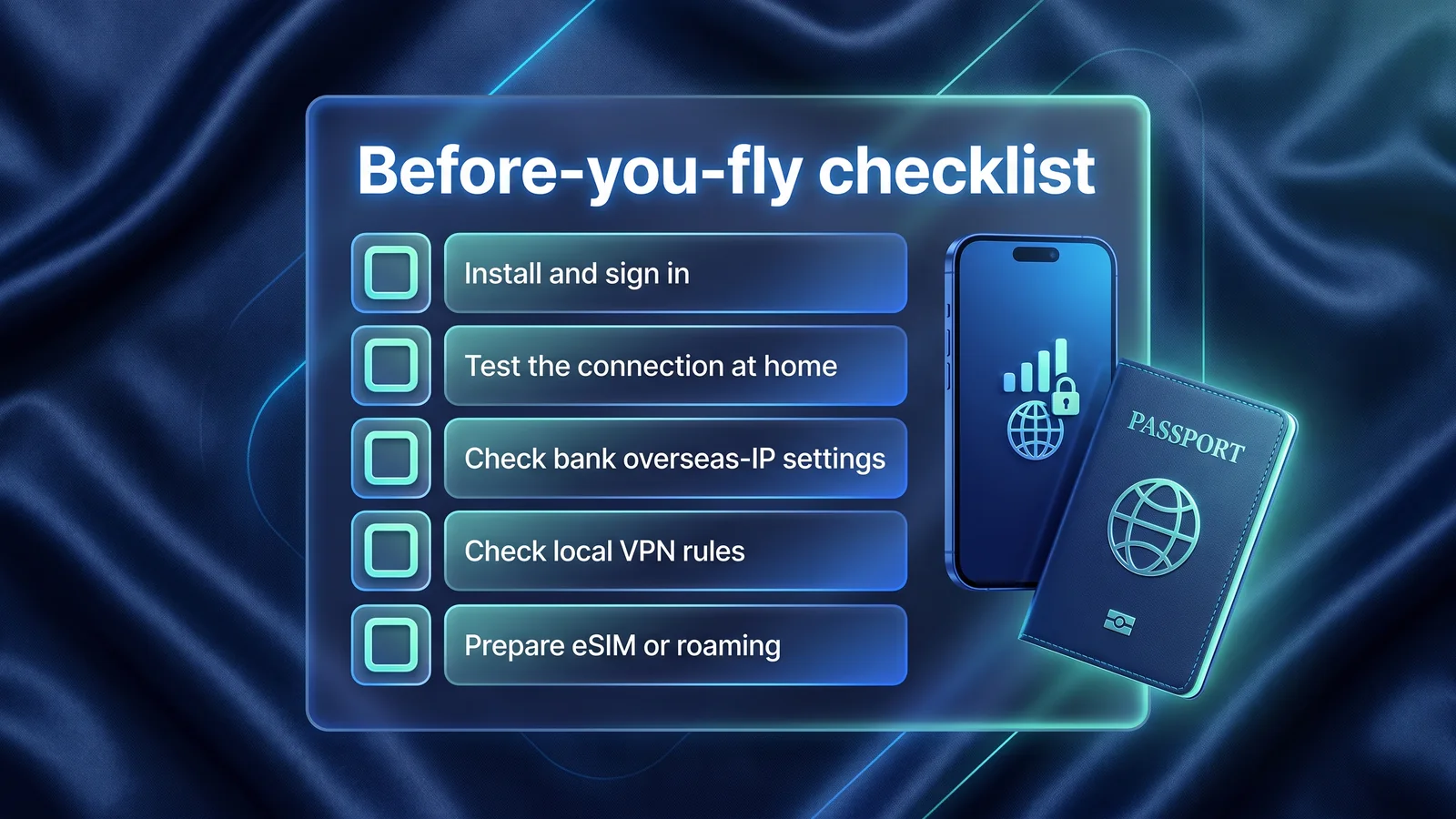
Pre-departure checklist: What needs to be done?
Account and subscription items have been added to the five items in the picture above, along with confirmation methods. If you proceed in order through the viewpoint columns, you won't miss anything that you can't revert locally.
| item | How to check | What happens if you miss it | point of view |
|---|---|---|---|
| Check local VPN regulations | Ministry of Foreign Affairs safe overseas travel, local embassy notice | Risk of violating local laws | After reserving a flight ticket, again 1 week before departure |
| Check bank overseas IP settings | Check whether foreign IP blocking is set in the banking app security menu. | Local transfer and login not possible, visit branch to cancel | 2 weeks before departure |
| Install app and log in | Install the StageVPN app on each device you're taking and log in | Time and data consumption for local installation and certification | 1 week before departure |
| Connection test in Korea | Approve permission to configure VPN by connecting once from your home Wi-Fi | At the airport, go through the permission screen and enter your device password again. | 1 week before departure |
| eSIM/roaming preparation | Purchase from an official retailer, check how to receive text messages from domestic numbers | Login/payment failed due to failure to receive verification text message | 1 week before departure |
| Account Recovery Method | Keep 2-step verification methods and recovery codes separate | If you log out, you cannot log back in. | The day before departure |
| Subscriptions and payment methods | Confirm where payment was made (App Store, Google Play, web payment) | Canceled due to payment failure during travel | The day before departure |
Once you've completed the checklist, things to do locally are reduced to three. All you have to do is verify your official Wi-Fi name, get past the login screen, and turn on your VPN. After the connected sign appears, just open your mail and banking apps. Just keep in mind that cancellation methods vary depending on your payment channel. iPhone is managed through the App Store, Android installed through the Play Store is managed through Google Play, and web and Chrome extensions are managed through web payments.
reference material
- safe overseas travel — Safety information by country/region, travel warnings, consular call center contact information (Ministry of Foreign Affairs)
- Overseas IP blocking service information — Definition of foreign IP blocking, application/cancellation method, cancellation information before departure (KB Kookmin Bank)
- Overseas IP blocking service information — Login blocked for non-domestic IPs, cancellation of counters, restrictions when using overseas servers (Post Office Finance)
- Are Public Wi-Fi Networks Safe? What You Need To Know — The relationship between public Wi-Fi and HTTPS encryption (US Federal Trade Commission FTC)
- Holiday Traveling with Personal Internet-Enabled Devices — Rules regarding public Wi-Fi, Bluetooth, and charging while traveling (US Cybersecurity and Infrastructure Security Agency CISA)
- KISA Protection Country — Wireless LAN security guide and latest security notice (Korea Internet & Security Agency)