
WireGuardis a VPN protocol that creates an encrypted virtual network connection (tunnel) between two devices that identify each other with a public key.
The StageVPN app (iPhone·iPad·Android) uses this WireGuard to send IPv4/IPv6 communications and DNS queries for the entire device to the VPN server. This article asks eight questions to explain why WireGuard is rated as fast and easy to review. For each question, I first wrote down a two-sentence answer and then explained the principles with tables and diagrams below. Figures are based on WireGuard white paper and official protocol documentation.
- Approximately 4,000 lines
- Code size of Linux kernel implementation at the time of white paper release in 2017
- 1 round trip
- Number of message round trips required for handshake to create session key
- 120 seconds
- When to start changing session keys with a new handshake
- 1 thing
- Number of fixed password combinations used without negotiation
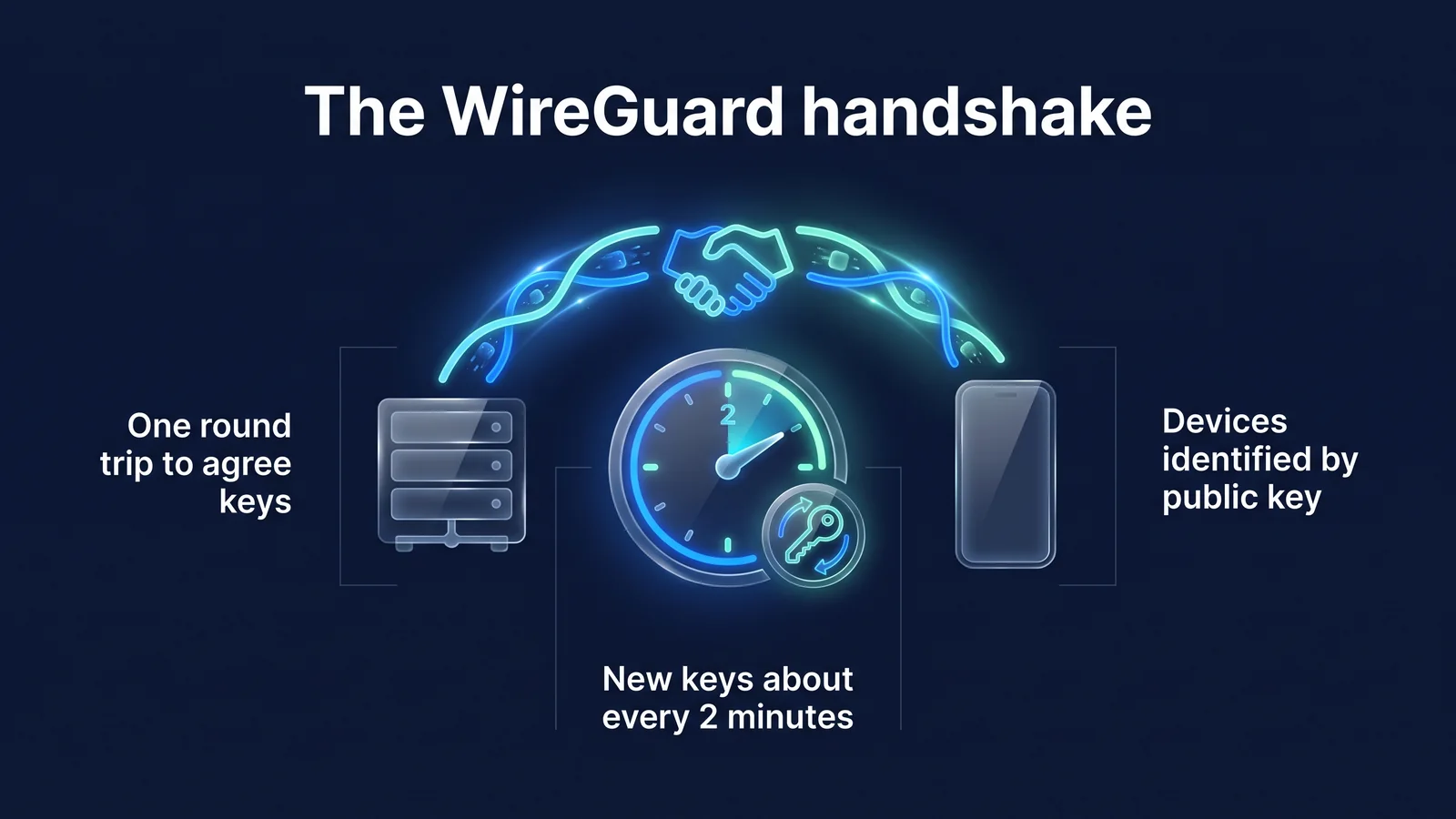
The picture below gathers the three most important properties in this article into one page. The device and server agree on the session key in one round trip. The key is refreshed approximately every two minutes. The server recognizes the other device by its public key, not its IP address. Read on to find out which questions each of the three properties answers.
Q. What is WireGuard, who created it and why?
WireGuard is a VPN protocol and implementation designed by Jason A. Donenfeld and released in 2017. The goal was to reduce the number of configuration items, fix the encryption method to one, and make it a size where experts can read and review the entire code.
The VPN protocol is a set of rules for devices and servers to identify each other, share encryption keys, and package and exchange data. Existing protocols have many options and negotiation steps to adapt to various environments. More options result in larger code. The possibility of creating a weak configuration due to configuration mistakes also increases. WireGuard took the opposite approach. We reduced the number of choices and made the code shorter.
| point of view | case | meaning |
|---|---|---|
| 2017 | White paper presented at NDSS conference | Design goals, handshake, and encryption key routing outlined in public document |
| March 2020 | Included by default in the Linux 5.6 kernel | Can be used on Linux servers without installing separate modules |
| After the white paper was released | Official implementations released for Windows, macOS, iOS, and Android | Smartphone app connects to server using the same protocol |
| today | Accumulation of format verification research such as Tamarin and CryptoVerif | The safety of the protocol design has been academically reviewed |
Code size depends on implementation and timing. So, 'approximately 4,000 lines' should not be read as the exact current value, but as 'an order of magnitude smaller than other VPN implementations.' The StageVPN app uses this WireGuard implementation on iPhone·iPad and Android. StageVPN for Chrome, a Chrome extension, is an HTTPS proxy rather than WireGuard. The difference between the two methods is Browser VPN vs App VPNIt is covered in
Q. In what order are WireGuard connections made?
A connection is created with a handshake of two messages, one round trip. When the initiator sends a start message and the responder returns a response message, both sides calculate the same session key and exchange data immediately.
- startup messageThe initiator (device) sends a temporary public key, an encrypted self-public key, and an encrypted timestamp.
- response messageThe responder (server) sends its temporary public key and verifies the initiator.
- Session key calculationFrom the key exchange results, both sides derive a pair of symmetric keys for sending and receiving.
- data transferEach packet is encrypted with ChaCha20-Poly1305 and assigned a sequence number (counter).
A handshake is a process by which two parties identify each other and agree on an encryption key before starting communication. WireGuard's handshake follows the IK pattern of the Noise framework. The IK pattern requires the initiator to know the responder's public key in advance. The StageVPN app satisfies this condition because it receives the public key of the server to connect to in the VPN configuration.
| message | size | Contents included | role |
|---|---|---|---|
| Initiating handshake (type 1) | 148 bytes | Temporary public key, encrypted static public key, encrypted timestamp, 2 MACs | Proof of initiator identity, block replay attacks |
| Handshake response (type 2) | 92 bytes | Responder temporary public key, empty ciphertext for verification, 2 MACs | Key agreement completed |
| Cookie response (type 3) | 64 bytes | encrypted cookies | Check departure address when server is overloaded |
| Data (Type 4) | Header 16 bytes and ciphertext | Recipient number, counter, encrypted IP packet and authentication tag | actual communication delivery |
The timestamp in the startup message prevents replay attacks. A replay attack is an attack in which an attacker records a normal message and resends it later. The server discards a message if the timestamp is older than a previous send from the same device.
The first MAC can be created by knowing the server's public key. Therefore, the server does not respond to packets sent by scanners that do not know the server public key. From the outside, it is difficult to even tell if there is a VPN server on that port. When the server is overloaded, a cookie response is sent first before performing heavy calculations. It is a device that processes only requests whose source address is confirmed to be genuine, preventing attacks that keep the server busy with counterfeit addresses.
Q. What encryption technique does WireGuard use?
Set only one cryptography method for each role and use it without negotiation. If a problem is found with a technique, instead of adding options, we change the protocol version so that all implementations move together.
The full name of the handshake as written in the official documentation is Noise_IKpsk2_25519_ChaChaPoly_BLAKE2s. The name is the scheme. IK stands for handshake pattern, psk2 stands for optional pre-shared key, 25519 stands for key exchange curve, ChaChaPoly stands for data cipher, and BLAKE2s stands for hash.
| role | techniques | supporting document | characteristic |
|---|---|---|---|
| Handshake Design | Noise_IKpsk2 pattern | Noise Protocol Framework | Mutual authentication, key agreement, and initiator identity protection in one round trip |
| key exchange | Curve25519(X25519) | RFC 7748 | 32-byte public key, elliptic curve designed to reduce implementation mistakes |
| Data encryption and integrity | ChaCha20-Poly1305 | RFC 8439 | Processes encryption and tampering checks at once, fast even without hardware acceleration |
| Cookie Encryption | XChaCha20-Poly1305 | WireGuard Protocol Documentation | Modification for safely writing long random values |
| Hash and MAC | BLAKE2s | RFC 7693 | Fast hash, also used for keyed MAC calculations |
| key derivation | HKDF | RFC 5869 | Extract session key from key exchange result |
| internal hash table | SipHash24 | Aumasson·Bernstein paper | Prevent manipulation attacks targeting hash tables |
It is important to note that there is no negotiation phase. In protocols that exchange lists of ciphers, such as TLS or IKEv2, downgrade attacks have been studied to trick attackers into choosing weak ciphers. WireGuard doesn't have a list of its own to choose from. Therefore, there is no point for such an attack to be established.
psk2, or pre-shared key, is an optional feature. By adding a layer of symmetric keys on top of public key cryptography, it is an additional defense to protect communication content even if a future quantum computer breaks Curve25519. This is an optional feature, so availability varies by service. StageVPN does not offer quantum-resistant encryption as an offered feature.
The safety of the design has been academically reviewed several times. The WireGuard project gathers formal verification research on its official site, including symbolic verification using the Tamarin prover and computational proof using CryptoVerif. However, formal verification is a proof of the protocol design. We do not guarantee the implementation quality or server operation of each app. So it's still necessary to keep the app up to date and check the operator's logging policy.
Q. How often do session keys change?
Session keys are replaced with a new handshake approximately every two minutes. The replacement takes place while communicating with the existing key, so users don't notice any disruption.
- 0 secondsHandshake completed
Start data transfer with the new session key.
- 120 secondsStart a new handshake
When you have data to send, create a new key (REKEY_AFTER_TIME). The key is also replaced if the message is sent to the power of 2 60.
- 180 secondsReject old key
Packets with keys older than this time will not be received (REJECT_AFTER_TIME).
- 540 secondsIdle Cleanup
After three times 180 seconds without a new handshake, clear all temporary keys and session state.
The reason why you frequently change keys is because of forward security. Forward security is a property that prevents the communication contents of an already ended session from being released even if the device's long-term private key is later exposed. WireGuard creates a new temporary key for each handshake and clears any used keys from memory. Even if a single session key were to be leaked, the scope of impact would be limited to the few minutes the key was used.
There are also rules for handshake attempts. If there is no response, it tries again every 5 seconds (REKEY_TIMEOUT). If there is no response for 90 seconds (REKEY_ATTEMPT_TIME), the attempt will stop. If there is no data to send within 10 seconds (KEEPALIVE_TIMEOUT) of receiving data, an empty keepalive packet is sent so that the other party can confirm the response.
WireGuard is designed to not perform a handshake if there is no data to send. However, devices behind routers or carrier equipment (NAT) often use a setting (PersistentKeepalive) that sends empty packets at regular intervals to prevent connection information from being erased. Official guidance recommends an interval of 25 seconds. The StageVPN app's VPN configuration also uses 25 seconds by default (as of September 2026).
Q. How is WireGuard different from OpenVPN and IKEv2/IPsec?
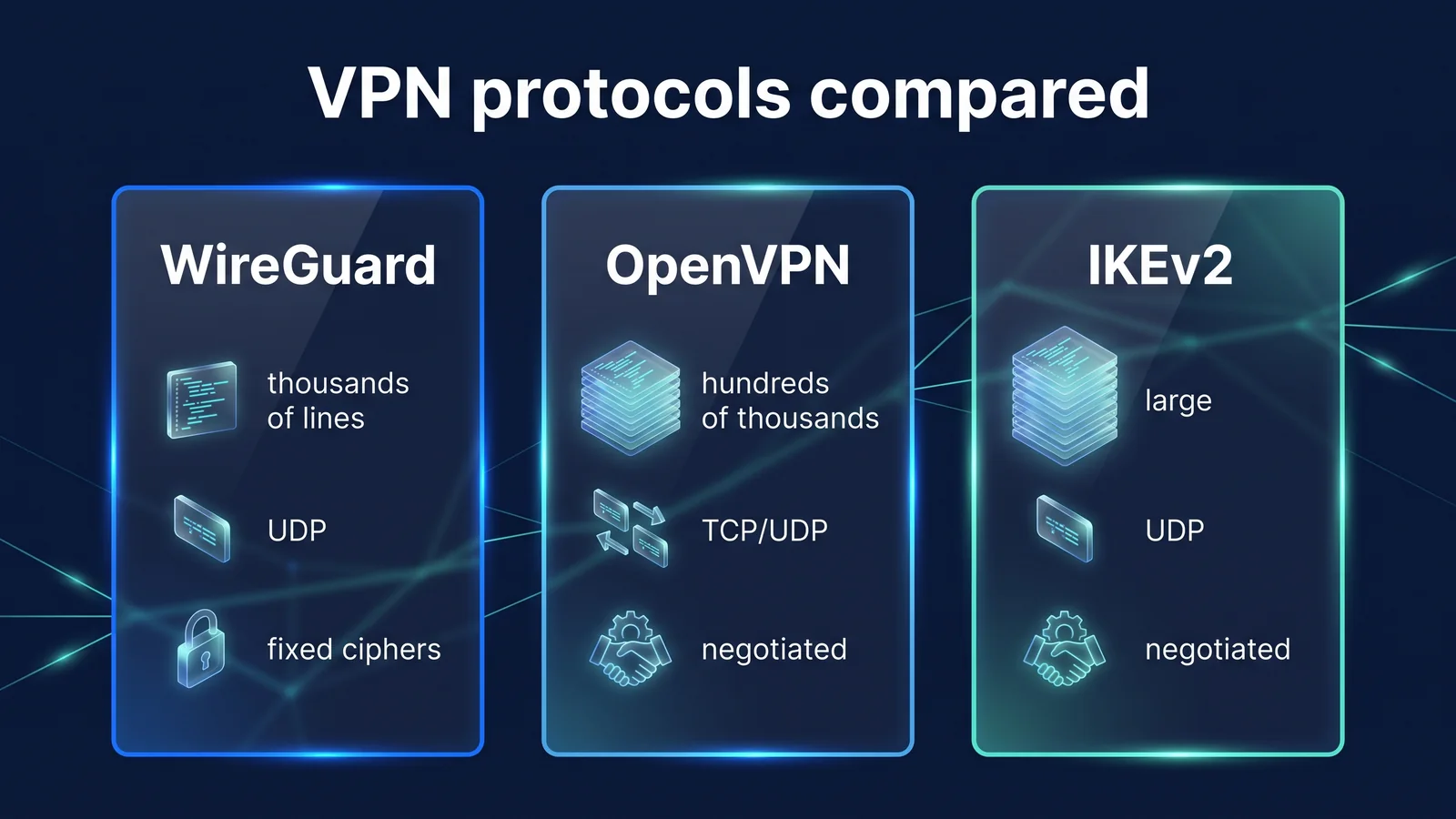
WireGuard is a protocol that reduces options and reduces code. OpenVPN and IKEv2/IPsec are protocols with many negotiations and options to suit various environments.
The figure above shows the differences in code size, transmission method, and password negotiation method. The table below summarizes the remaining differences not shown in the figure. All three are currently widely used, but their design philosophies are different, rather than one being unconditionally superior.
| item | WireGuard | OpenVPN | IKEv2/IPsec |
|---|---|---|---|
| Open/standard | 2017 white paper, including 2020 Linux kernel | First released in 2001, its own open source protocol | IETF standard (IKEv2 is RFC 7296) |
| Partner confirmation method | 32 byte public key | Mainly X.509 certificate, user name and password can be combined | Certificates, pre-shared keys, EAP, and more |
| Key agreement round trip | 1 round trip (2 messages) | Several times, including the TLS handshake. | Minimum of 2 exchanges (4 messages) |
| network change | Resulting from default behavior (roaming) | Mostly reconnection, some support depending on settings | Continued with support for MOBIKE (RFC 4555) |
| Setting items | A few lines: key, address, allowed IP, etc. | Lots of certificates and options | There are many authentication methods and policy items |
| Built-in operating system | Built-in Linux kernel, others provided as apps | Install separate program | Built-in for Windows, iOS, Android, etc. |
Speed is not determined by protocol alone. Distance to the server, local line quality, server congestion, and device performance all play a role. WireGuard has simple procedures and light cryptographic operations, so it is often fast under the same conditions. That's not to say it's always fast. If the perceived speed is low, the first thing to do is to switch to a nearby server and compare.
Q. What is ‘encryption key routing’ where the public key becomes the address?
Encryption key routing is a method that bundles the other party's public key and the IP address range (AllowedIPs) that the other party can use, and uses this bundle to determine both when sending and receiving packets. When sending, determine which public key to encrypt with the destination address, and when receiving, check whether the public key that successfully decrypted is qualified to use the source address.
This structure has two advantages: First, the server recognizes packets from a tunnel IP as genuine only if they are decrypted with the public key tied to that IP. Even if another device imitates the tunnel IP, it cannot be decrypted and the packet is discarded. Second, firewall rules and password rules are combined into one. Administrators only need to maintain one line: 'This public key is this address range.'
If you set AllowedIPs to 0.0.0.0/0 and ::/0 on the user device, all IPv4 and IPv6 communications become a full tunnel to one server. The StageVPN app uses this method. The main items of WireGuard configuration that the app receives from the server are listed below.
| Configuration items | StageVPN app settings | Meaning for users |
|---|---|---|
| AllowedIPs | 0.0.0.0/0, ::/0 | Protects all devices where all IPv4/IPv6 communication goes through a tunnel |
| DNS | The DNS server specified in the VPN configuration and queries are also forwarded into the tunnel. | Difficulty seeing domains looked up by carriers or Wi-Fi operators |
| Tunnel IP (Address) | Assign internal addresses within the server to each account | The server identifies devices using public keys and internal addresses. |
| MTU | Default 1280, may vary depending on server settings | Reduces packet truncation issues in mobile networks and double encapsulation |
| PersistentKeepalive | Default 25 seconds | Maintain connection information even behind router or carrier equipment |
| connection location | Choose from operator-managed server countries or auto-select | The IP of the selected server is displayed on visited sites. |
MTU is the maximum size of packets that can be sent at one time. WireGuard encrypts the original packet and puts it back into a UDP packet, increasing the size by the header. Therefore, the MTU in the tunnel must be set smaller than the MTU in the line to prevent packets from being fragmented or discarded. What and how much access records are kept? Access record storage noticeIt is open to the public.
Q. If WireGuard is strong, is my entire Internet use safe?
no. The section that WireGuard protects is from your device to the VPN server, and safety beyond that is determined by the site's HTTPS and the operator's logging policy.
- my deviceStageVPN App
- WireGuard encryption
- Public Wi-Fi/communication networkCafe·LTE
- WireGuard encryption
- VPN serverStageVPN
- HTTPS
- Website/App ServerBank/mail
- VPN encryption
- Site HTTPS
- Areas that may be exposed
In the left two sections of the picture, it is difficult for other users of public Wi-Fi, the Wi-Fi operator, and the carrier to see the content and destination of the communication. After you leave the VPN server, it's just like regular internet. So again, it becomes important whether the address is a site that starts with https://. Risks outside the protocol must be prepared separately.
- Section after VPN server: Sites that do not use HTTPS are not encrypted from the VPN server to the site.
- Trust in operators: Due to its structure, the WireGuard server knows the public key, tunnel IP, and last access address of each device. This is also where you can see the destination IP of your connection. In accordance with the Communications Secrets Protection Act, StageVPN automatically deletes access records after 93 days and does not record communication content. The reason is Why are we disclosing our access record retention policy?explained.
- Threats Inside Your Device: Malicious apps or phishing pages are problems that occur inside the tunnel, that is, on your device. The protocol doesn't stop it. The division is What VPNs Prevent and Can't PreventPlease refer to .
- The moment the connection is lost: While the tunnel is disconnected, communication can go out through the normal route. Check the app's connection status before performing any sensitive operations. Habits on public networks Public Wi-Fi Safety RulesI organized it in .
- DNS and IPv6: If another VPN app or your device's separate DNS settings change the route, queries may go out of the tunnel. How to check Guide to DNS Leaks and WebRTC LeaksIt is in
When you first connect, iPhone will ask you to add a VPN configuration, and Android will ask you to allow the VPN connection request. You must allow this so apps can create WireGuard tunnels. Order by device Getting started on iPhone/iPadand Getting started on Androidand the scope of provision is Features and Scope of OfferingYou can check it here.
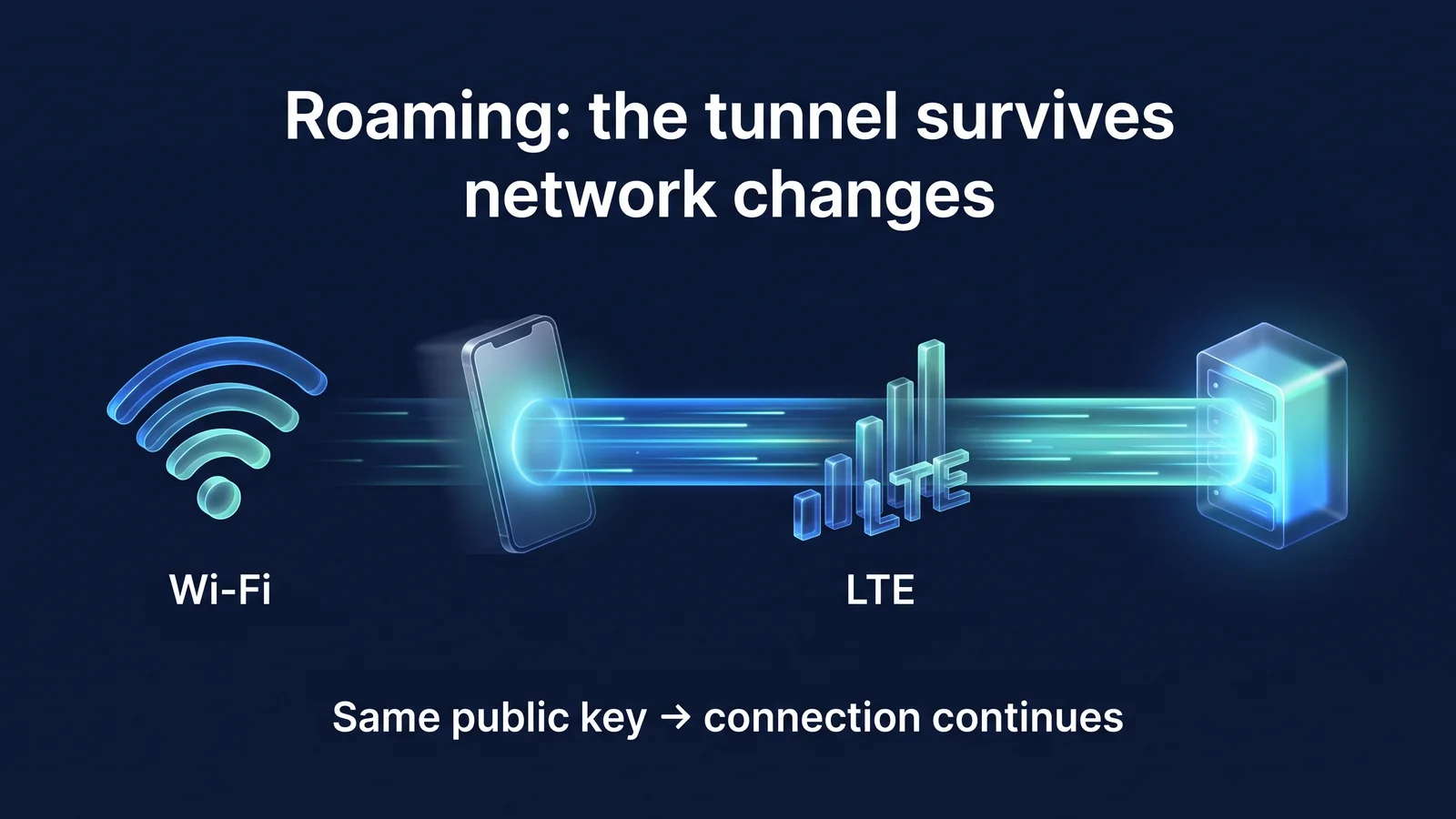
Q. Why does the connection remain even when changing from Wi-Fi to LTE?
This is because WireGuard identifies devices by their public keys, not their IP addresses. Even if the network changes and the IP changes, the server remembers the address where the decrypted packet last arrived and responds with that address.
How to distinguish connections by IP address
- Existing connections are lost when networks change
- Need to authenticate again and agree on keys
- App communication is likely to stop at the moment of transition
WireGuard (differentiated by public key)
- Packets from a new address are also recognized as the same party if they are decrypted with the same public key.
- Update the address to which the server responds with a new address
- If key life remains, it continues immediately without handshake.
This behavior is called roaming. Smartphones switch between home Wi-Fi, cafe Wi-Fi, and LTE/5G while on the move several times a day. If the VPN is reconnected from the beginning every time, there will be a moment when messaging and streaming will stop. WireGuard handles this transition as the protocol default behavior. No separate settings are required.
WireGuard only uses UDP. UDP is a lightweight transmission method that does not require a connection establishment procedure. It does not overlap with retransmission control of TCP communications going back and forth within the tunnel. There is a known problem that when TCP is layered on top of TCP, when a loss occurs, both layers retransmit simultaneously and the speed drops significantly. WireGuard architecturally avoids this problem.
Meanwhile, StageVPN records the IP address from which the device accessed the VPN server when it changes, as one of the connection records according to the law. The very fact that roaming occurs means that it remains on the server.
Please know There are limitations to designs that only use UDP. Some hotel, company, and school networks block UDP communications other than web access. WireGuard connection may not work in such places. In this case, try switching to another Wi-Fi or mobile data. If it still doesn't work, list the device model, operating system and app version, and time of occurrence. customer supportPlease contact us.
glossary of terms
I have organized the terms in this article one sentence at a time. The same meaning is used when reading other VPN documents.
- handshake
- This is a process where two devices identify each other and agree on an encryption key before starting communication.
- 1-RTT (1 round trip)
- This means that the process is completed just by sending a message once and returning once.
- Static key (public key/private key)
- A key pair that is kept on your device for a long time and used to verify your identity. The public key is known to the other party, and the private key is not sent out of the device.
- temporary key
- This key is created anew for each handshake and erased at the end of the session.
- session key
- A symmetric key created as a result of the handshake that encrypts the actual data.
- Forward security
- This property prevents the contents of an already ended session from being released even if the long-term private key is later exposed.
- AEAD
- ChaCha20-Poly1305 is a cryptographic method that processes encryption and tampering detection at once.
- MAC
- This is a short value that is calculated and attached to the key to ensure that the message has not been forged.
- replay attack
- This is an attack that tricks the system by recording a normal message and sending it again later.
- Encryption key routing
- WireGuard's method of tying public keys and allowed IP ranges to determine which keys to encrypt and which packets to accept.
- AllowedIPs
- This is the range of IP addresses that the counterpart of a specific public key can send to and receive from. 0.0.0.0/0 and ::/0 refer to all addresses.
- endpoint
- This is the other party's actual Internet address and UDP port, and the server updates these values when roaming occurs.
- roaming
- Even if the device's IP address changes, the same tunnel continues.
- NAT
- This is a method in which a router or telecommunication company equipment converts the addresses of multiple devices into one public address.
- keepalive
- This is a contentless packet sent periodically to prevent connection information from being erased.
- MTU
- This is the maximum size of packets that can be sent at one time.
- UDP
- It is a lightweight transmission method that sends packets without connection establishment procedures and without retransmission.
reference material
- Protocol & Cryptography — Message format and size, cryptography, timer values (WireGuard project)
- WireGuard: Next Generation Kernel Network Tunnel — Design goals, code size, encryption key routing, roaming (Jason A. Donenfeld, NDSS 2017 white paper)
- Formal Verification — List of formal verification studies, including Tamarin, CryptoVerif, etc. (WireGuard project)
- Quick Start — PersistentKeepalive settings and recommended intervals (WireGuard project)
- The Noise Protocol Framework — Definition of IK handshake pattern (Noise project)
- RFC 8439: ChaCha20 and Poly1305 for IETF Protocols — Data encryption method (IETF)
- RFC 7748: Elliptic Curves for Security — Curve25519 Key Exchange (IETF)
- RFC 7693: The BLAKE2 Cryptographic Hash and MAC — Hash and MAC calculations (IETF)
- RFC 7296: Internet Key Exchange Protocol Version 2 (IKEv2) — IKEv2 Exchange Procedure (IETF)
- RFC 4555: IKEv2 Mobility and Multihoming Protocol (MOBIKE) — Network Change Handling in IKEv2 (IETF)